


Plataforma en la nube de videollamadas y webinars
Videollamadas y webinars de nivel empresarial integrados directamente en tu sistema de comunicaciones unificadas
Reúnete, presenta, impresiona
¿Por qué usar las videoconferencias de Wildix?

Potenciado con IA
Transforma tu forma de trabajar con reuniones que piensan por ti:
- Transcripción en tiempo real a más de 50 idiomas
- Resúmenes automáticos de reuniones para no perder los puntos claves y los pasos a seguir
- Análisis de Sales Intelligence para entender las dinámicas y resultados de las reuniones
- Análisis de sentimientos para medir la interacción y reacción de los participantes
- Funcionalidad para ponerte al día. ¿Te has perdido el principio? Revisa la transcripción en vivo para saber rápidamente de qué se ha hablado

Sin instalaciones
Olvida los problemas técnicos con reuniones usando la tecnología WebRTC:
- Inicia reuniones directamente desde x‑bees o Collaboration 7 sin necesidad de cambiar de app
- Sin descargas, instalaciones o actualizaciones para ninguno de los participantes
- Únete desde cualquier navegador web o usando la app móvil
- Disfruta de la misma amplia gama de funcionalidades desde el navegador o desde la app móvil
Simplificando la accesibilidad externa
Invita a clientes, personas interesadas, proveedores y partners sin esfuerzo:
- Los huéspedes pueden unirse directamente desde el navegador con un enlace
- App móvil disponible para iOS y Android para reuniones espontáneas
- La misma funcionalidad desde todos los dispositivos y plataformas
- Sin necesidad de crear cuentas para participantes externos
En un vasto océano de software para hacer reuniones web, las videoconferencias y los webinars de Wildix ofrecen una amplia variedad de capacidades que harán tus videoconferencias intuitivas y sencillas. Reúnete con cualquier persona, cuando y desde donde quieras, usando cualquier dispositivo.
Pásate a las videollamadas web para ofrecer:
Seguridad:
Mantén la seguridad y confidencialidad de todas las videollamadas con conexiones punto a punto y encriptación integrada.
Sencillez:
Reúnete con compañeros o terceras personas con tan solo un clic, sin necesidad de descargar nada.
Conectividad:
Únete a conferencias desde cualquier dispositivo (incluyendo ordenadores, Android, iOS y más) desde tu navegador favorito o la app móvil.
Todo lo que necesitas para reuniones profesionales
Herramientas avanzadas de colaboración
Trabajar juntos de forma transparente con excelentes funcionalidades en tus reuniones.
- Grabación de reuniones con almacenamiento seguro y posterior reproducción
- Chat disponible antes, durante y tras las reuniones (a menos que se seleccione modo de solo lectura)
- Salas de descanso para talleres y actividades de equipo
- Posibilidad de compartir varias pantallas: más de una persona puede presentar en un momento dado
- Pizarra interactiva para las salas de descanso
- Distribución de archivos directamente disponible en la interfaz de la reunión
- Reacciones en vivo y posibilidad de levantar la mano para hacer las presentaciones más interactivas


Escalabilidad sin límites
Aloja reuniones y webinars de cualquier tamaño.
- Sin límite de participantes: invita a tantas personas como necesites
- Sin límite de participantes de vídeo: todos pueden ser vistos y escuchados
- Modo webinario para presentaciones a larga escala y ayuntamientos
- Perfecto para educación, formación, clases virtuales y reuniones para toda la empresa
- Soporte para streaming en directo a Facebook y YouTube
Seguridad de nivel empresarial
Reúnete con la seguridad de saber que tus conversaciones están protegidas.
- Encriptación integrada con conexiones punto a punto de WebRTC
- Almacenamiento seguro de grabaciones con control de acceso solo para creadores
- Controles de moderación, incluyendo silenciar, control de cámara y eliminación de participantes
- Sin necesidad de configurar VPNs, firewalls o elementos de seguridad adicionales
Reuniones rápidas, cómodas y seguras desde la nube
Consigue lo mejor del software de reuniones web con:
Funciones básicas para reuniones
1
- Videoconferencias web usando WebRTC
- Soporte para participantes ilimitados
- Calidad HD para sonido y vídeo
- Compartir pantalla (varias pantallas simultáneamente)
- Fondos virtuales
- Vista de rejilla y de participantes
- Opción de solo sonido
- Control de escritorio remoto
IA e inteligencia
2
- Transcripción en tiempo real (más de 50 idiomas)
- Resúmenes automáticos de reuniones
- Análisis de Sales Intelligence
- Análisis de sentimientos
- Seguimiento de porcentajes hablados
- Estadísticas de los participantes
Herramientas de colaboración
3
- Chat en la reunión con posibilidad de compartir archivos
- Salas de descanso
- Pizarra interactiva
- Reacciones en directo
- Funcionalidad para levantar la mano
- Grabación de reuniones
Integración y productividad
4
- Disponible en x‑bees y Collaboration 7
- Integración con Google Calendar
- Integración con Microsoft 365
- Integración con sistemas CRM
- Planificador de reuniones con reservas externas
- Análisis de MeetingsView
- Monitorización en tiempo real de LiveView
Seguridad y control
5
- Encriptación con WebRTC
- Reuniones protegidas con contraseña
- Almacenamiento seguro para grabaciones
- Controles de moderación para anfitriones
- Control de cámara y silenciado de participantes
- Capacidades para eliminar usuarios
Haz más en tus reuniones virtuales aprovechando estas capacidades y más opciones disponibles para ventas.
Hardware y accesorios
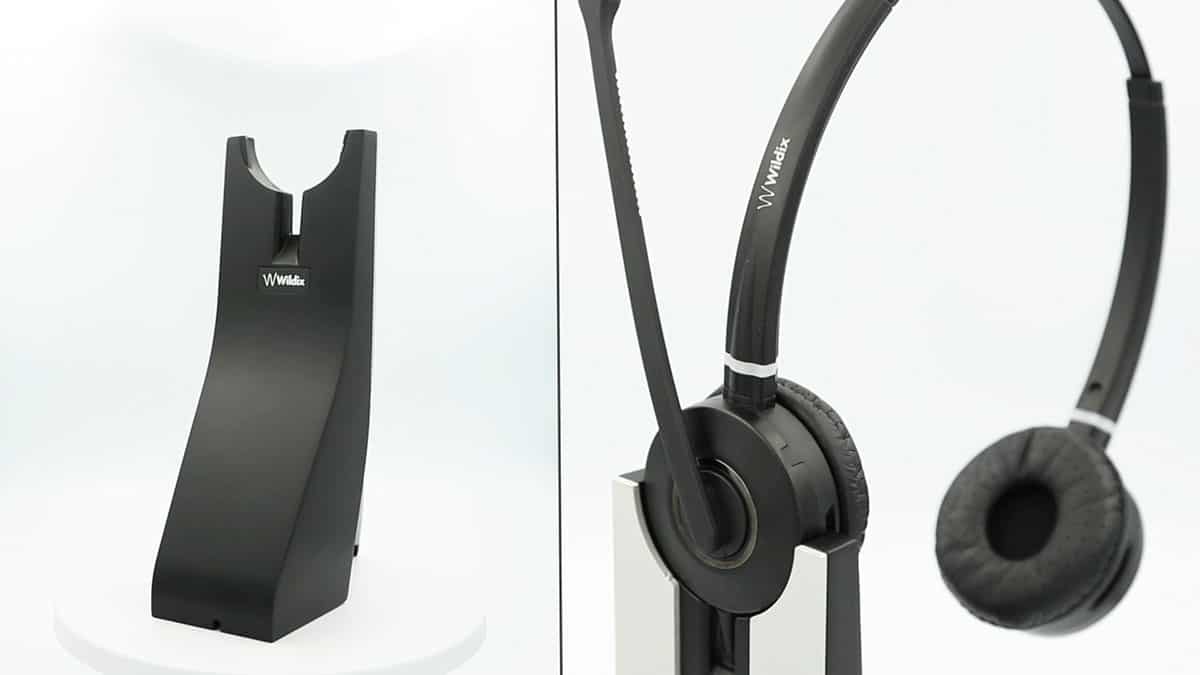
Ve más allá del micrófono y de la cámara integrada en tu portátil con la línea de hardware para videoconferencias de Wildix.
Auriculares DuoLED
Experimenta el chat de voz y sonido de alta calidad con estos auriculares premium para videollamadas.
Creado con LEDs integrados para informar a tus compañeros de tu estado: verde para disponible, rojo en conferencia, amarillo ausente y más. Disponible en versiones cableadas y por Bluetooth, dale luz verde a tu éxito.

Auriculares MonoLED
La misma calidad de sonido e indicadores de estado que los auriculares DuoLED, ahora en un dispositivo monoaural.
Mantente activo en las llamadas mientras tienes un oído puesto en la actividad de la oficina. Los colores LED alertan a los compañeros cuando estás libre u ocupado.
Disponible en versión cableada y Bluetooth.
Funcionalidades de los auriculares:
- Incluye adaptador USB y soporte para mesa
- Enchufe tipo USB tipo C
- Botones intuitivos para responder, colgar, silenciar llamadas y control de volumen
- Estados LED para indicar: disponible, ausente, no molestar, en llamada, llamando, llamada en espera o llamada perdida



Reúnete con total seguridad
Wildix usa la tecnología WebRTC para crear conexiones de vídeo y audio completamente seguras gracias a su diseño. Las comunicaciones viajan entre los participantes sin necesidad de VPNs, firewalls o SBCs.
WebRTC funciona en tu navegador, no es un programa separado. Esto significa que incluso si la seguridad del dispositivo está comprometida, tus comunicaciones siguen protegidas.
Controles de seguridad adicionales:
- Reuniones protegidas con contraseña
- Almacenamiento de grabaciones seguras (accesible con los permisos relevantes)
- Moderación del anfitrión: silenciar participantes, desactivar cámaras y eliminar asistentes
Tus reuniones serán privadas y seguras sin necesidad de configuración adicional.

Disponible en x-bees y Collaboration 7
La plataforma de videoconferencias de Wildix con modo para webinars está completamente integrada tanto en x‑bees como en Collaboration 7, ofreciéndote la flexibilidad de elegir el sistema de comunicaciones unificadas que se ajuste mejor a tus necesidades empresariales.


Ambas plataformas ofrecen:
- El mismo potente motor para videoconferencias
- Idénticas funcionalidades impulsadas por IA
- Integración completa con calendarios y CRM
- Acceso completo a las herramientas de colaboración
- Seguridad para entornos empresariales
Ya uses x-bees para simplificar la interfaz o Collaboration 7 para obtener funcionalidades más avanzadas, tendrás la misma experiencia de primer nivel a la hora de hacer videoconferencias.
Historias de éxito de clientes

Matt Argyle
Jefe de TI en at Children’s Hospice South West
Sentimos que somos unos privilegiados porque contamos con una solución completa que cumple nuestras necesidades. Wildix nos ha permitido evolucionar nuestro producto al integrar videoconferencias.


Stefano Perrone
Jefe de operaciones en Parma Calcio

La plataforma de Wildix es realmente sencilla de usar. Para poder obtener acceso a una reunión o formación específica, solo necesitas crear una videoconferencia y mandar el enlace a las partes interesadas. No importa si es alguien interno o externo a la empresa. Eso nos facilita mucho el trabajo y nos permite mantener unos altos estándares de calidad en nuestro servicio.
Casos de uso

Equipos de ventas:
Cierra tratos más rápido. Realiza demos y presentaciones de producto en directo mientras automatizas flujos de trabajo para reducir las tareas manuales.
Educación y formación:
Crea clases virtuales con salas de descanso, pizarra y participantes ilimitados.
Reuniones para ayuntamientos y empresas:
Aloja webinars a gran escala con streaming en directo, encuestas y funcionalidades interactivas.
Atención al cliente:
Ofrece asistencia cara a cara con capacidad de compartir pantalla y control por escritorio remoto.
Equipos remotos:
Colabora de forma transparente con un chat persistente, uso compartido de archivos y grabación de reuniones.
¿Listo para transformar tus videoconferencias?
Experimenta la diferencia de una solución de videoconferencia realmente integrada para empresas modernas.
Preguntas frecuentes
¿Los participantes necesitan descargarse algo?
No. Los participantes externos pueden unirse directamente desde su navegador sin necesidad de descargarse nada. Tu equipo podrá acceder a las reuniones directamente desde x‑bees o Collaboration 7.
¿Cuántas personas pueden unirse a una reunión?
El límite lo establece tu ancho de banda. Sin embargo, se recomienda que no haya más de 70 participantes con el vídeo activado para mantener un rendimiento óptimo.
¿Es mi reunión privada y está segura de invitados no deseados?
Sí. La tecnología WebRTC ofrece encriptación integrada con conexiones directas punto a punto, asegurando que solo aquellas personas invitadas tengan acceso a tus reuniones. Nadie podrá unirse de forma aleatoria o escuchar tus conversaciones, todo esto sin necesidad de VPNs o firewalls adiciones.
¿Puedo grabar reuniones?
Sí. Todas las reuniones pueden almacenarse de forma segura. Solo el creador de la reunión y otros usuarios del PBX (usuarios internos) con los permisos ACL necesarios tendrán acceso a la descarga.
¿Funciona en dispositivos móviles?
Sí. Únete desde cualquier dispositivo iOS o Android o usando el navegador o nuestra app móvil disfrutando de todas las funcionalidades.
¿Cómo funciona el sistema de precios?
Las videollamadas están incluidas en x‑bees y hace falta una licencia de webinar para Collaboration 7. Las salas de reuniones externas están disponibles desde las licencias UC Business o x‑bees Standard.
¿Listo para transformar tus videoconferencias?
Experimenta la diferencia de una solución de videoconferencia realmente integrada para empresas modernas.